
I’ve been using FireFox as my primary browser since version 0.9 and have admittedly grown quite attached to it. On the other hand, I’m quite fond of Google as well, so the prospect of making the switch to Chrome seemed almost inevitable as FF continues to grow into a resource heavy machine. The first deterrent however, was the lack of extension support in Chrome. The main reason I love FireFox (or so I though, as you’ll see in a moment) was for the extensions that make my day to day so much easier and that I cannot live without—such as Web Developer Toolbar, XMarks, AdBlocker Plus, pdfIt, and more.
Now that Chrome supports extensions, I really thought I was making the transition. I installed many extensions, and got Chrome to the point where I really felt like I could use it on a daily basis to accopmlish my tasks. It loads much, much faster and I thought I was in love! To my surprise, however, there are many nuances in Chrome itself that I feel make it lacking enough to the point that I cannot use it, in spite of extension support. In other words, I have complaints about the browser itself, not about the lack of extension support. These are things that extensions might possibly fix at some point, but I feel they belong as part of the browser’s base. Hopefully Chrome adopts many of these seemingly simple features as it graduates from Beta and beyond.
Here is my list of things I depend on in FireFox that are missing in Chrome:
- Several right click menu options
- “View Background Image” – While Chrome does have support for viewing a forground image in a seperate tab, I need the ability to view a background image. It’s a feature I use a lot in FF.
- “View Selection Source” – I understand the advantage of using the “Inspect Element” feature in Chrome, but the behavior is something quite different. I love that FireFox will show me only the code I’ve selected and highlights it in the popup window.
- Minimal frame options – Chrome has a few options to aid you within frames, but Firefox’s options are so much richer and I find myself missing them quite a bit
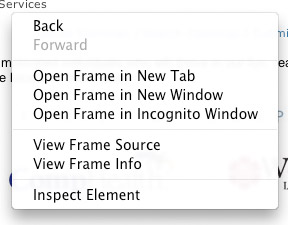
Chrome Frame Options
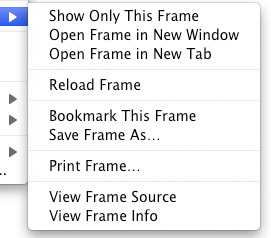
Firefox Frame Options
- Customization support – Simply plugging “about:config” into the FF browser offers a vast amount of customization settings. Enough to let you really screw things up if you aren’t careful. As of yet, all I’ve seen in Chrome is the ability to set a few startup switches.
- A perplexing inablility to use Google Bookmarks in a meaningful way – So I can synchronize bookmarks across browsers, fine…but where do they get stored if not in Google Bookmarks? Even extension support is weak at best.
- Bookmark dividers – I’m an organization freak, what can I say?
- Search as you type
- Good visual representation when the word you are searching for cannot be found – Chrome simply says “0 of 0” where FF changes the box to red.
I’m sure I’ll find more with time. These came about in a matter of a couple of days.
What about you? Have you found yourself having a hard time making the switch as you develop or use Chrome in your day to day? If you’ve found things in Chrome that you wish Firefox had, please share those as well.